Reaction speed barely improves with practice. I went through the primary literature on that in an earlier article. So what is an aim trainer actually doing?
The short answer: aiming is not a reaction, it is a movement, and there is room to improve there. But no controlled study shows that aim training raises your in-game performance — I looked, and there is none. Here is what the eight modes are doing, that caveat included.
Aiming is a movement, not a reaction
A reaction time test measures the gap between the signal and your press. Where to press is fixed; there is nothing to aim at. Aiming adds a second job: carrying the cursor to the target.
That carrying has a well-known regularity — Fitts's law. In the 1954 experiment, defining difficulty from the ratio of distance to target width as ID = log₂(2A/W) makes movement time a linear function of it. Across sixteen conditions spanning ID 1–7 bits, mean movement times ran from 180 ms to 731 ms, with a correlation of r = .9831.
The law holds for pointing with a mouse or a touchscreen, and the evaluation procedure has been standardised as ISO 9241-9. Across studies that did not follow it, reported mouse throughput ranged from 2.55 to 12.5 bps; across nine that did, it fell within 3.7–4.9 bits/s.
Fitts's law does not explain everything, though. A study using aim trainer data reported that performance across two different target sizes was not well described by Fitts's law. Shooting at targets is a little more complicated than a laboratory reaching task.
The eight modes and what each trains
There are eight because the "carrying" job differs by situation. Throwing your hand a long way and stopping it dead is a different skill from settling onto something small.
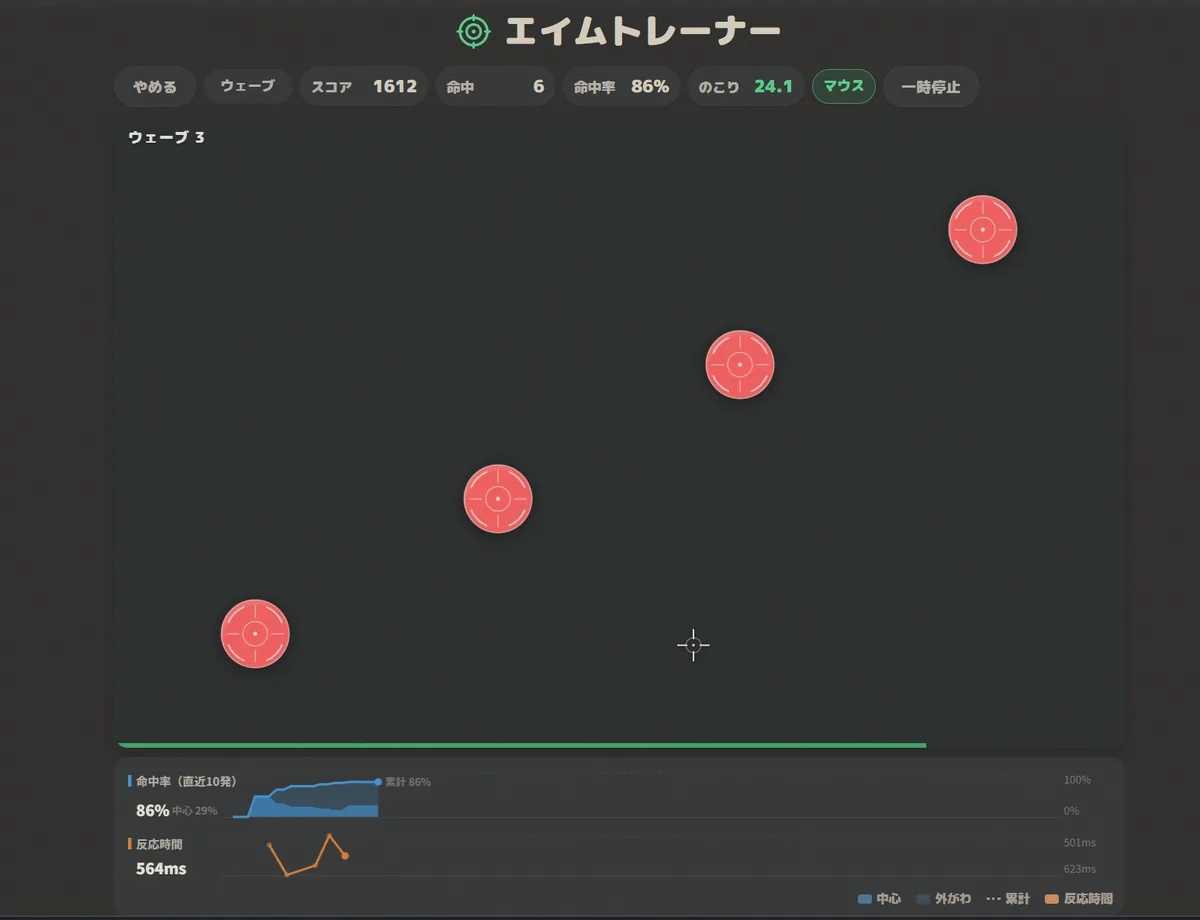
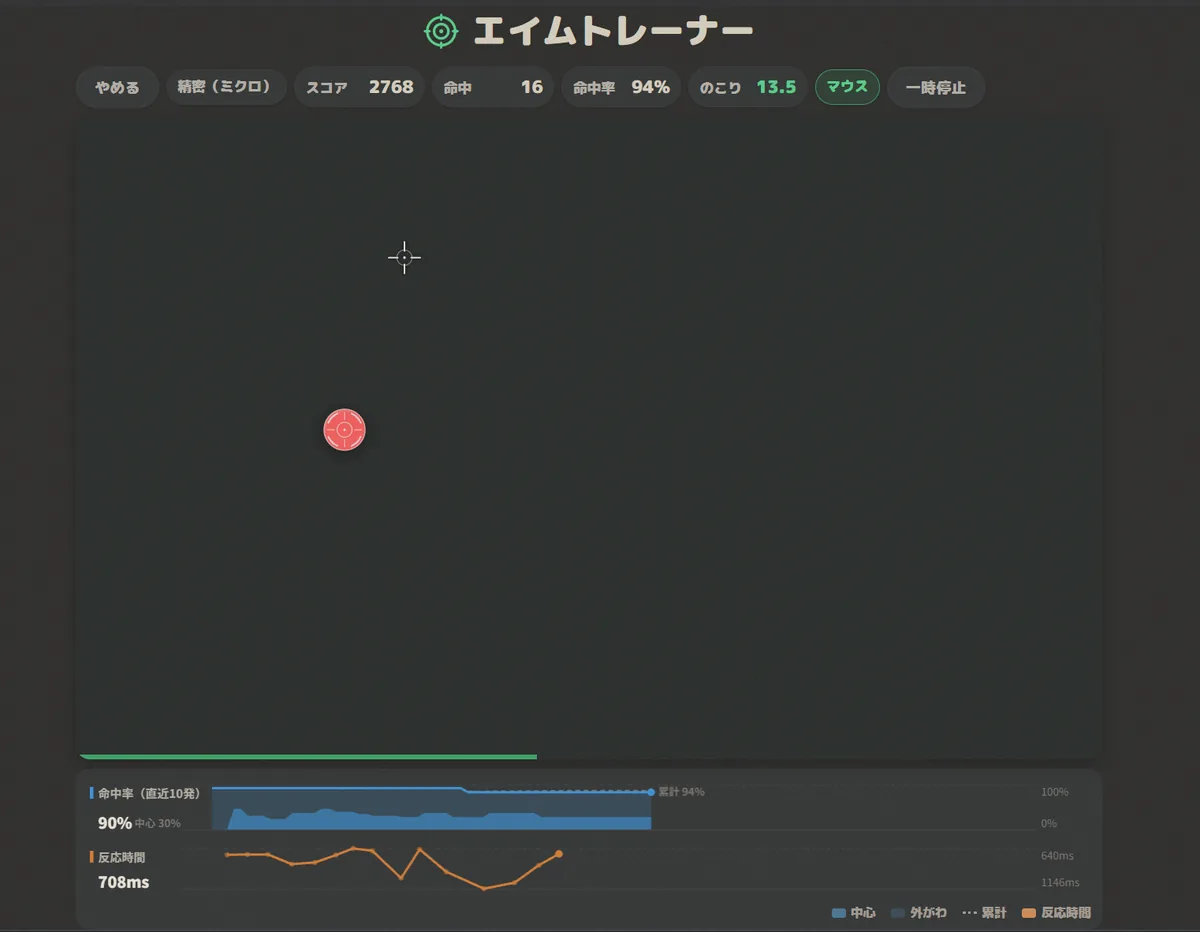
A note on the screenshots. The home screen, the live chart, the result screen and the settings panels are from the English build. Four of the gameplay shots are from the Japanese one, because an arena with targets on it reads the same either way.
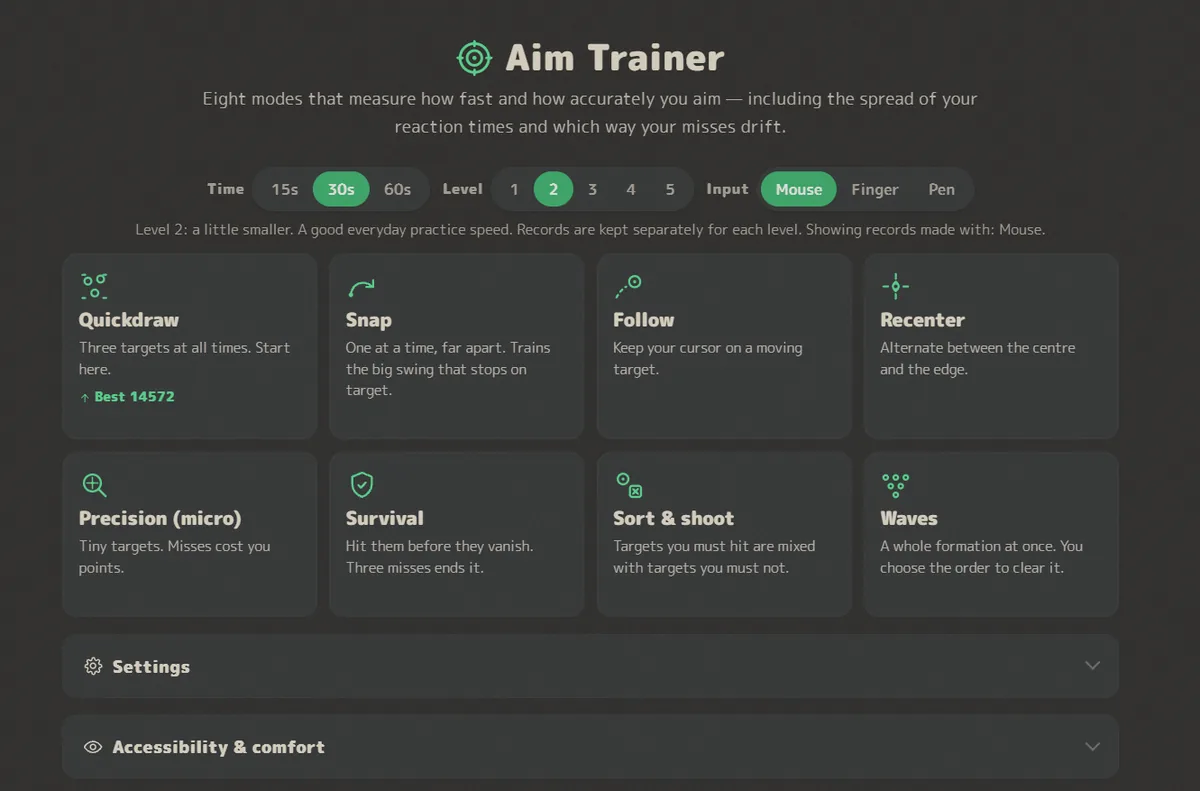
| Mode | What happens | What it trains |
|---|---|---|
| Quickdraw | Three targets at all times; hitting one respawns it elsewhere | Rhythm of consecutive shots, switching gaze |
| Snap | One at a time, always far from the last | Precision of a big swing that has to stop |
| Follow | Keep the cursor on a moving target. No clicking | Sustained tracking, fine wrist control |
| Recenter | Centre → outside → centre, alternating | Returning to a reference point, consistent distances |
| Precision (micro) | Small targets; a miss costs 50 points | Deciding to stop before shooting, not spraying |
| Survival | Targets shrink and vanish; three misses ends the run | Prioritising, working under pressure |
| Sort & shoot | Shoot-me and don't-shoot-me targets are mixed | Judging before shooting, suppressing misfires |
| Waves | Formations — a row, a circle, a cross — appear all at once | Planning a shooting order, width of attention |
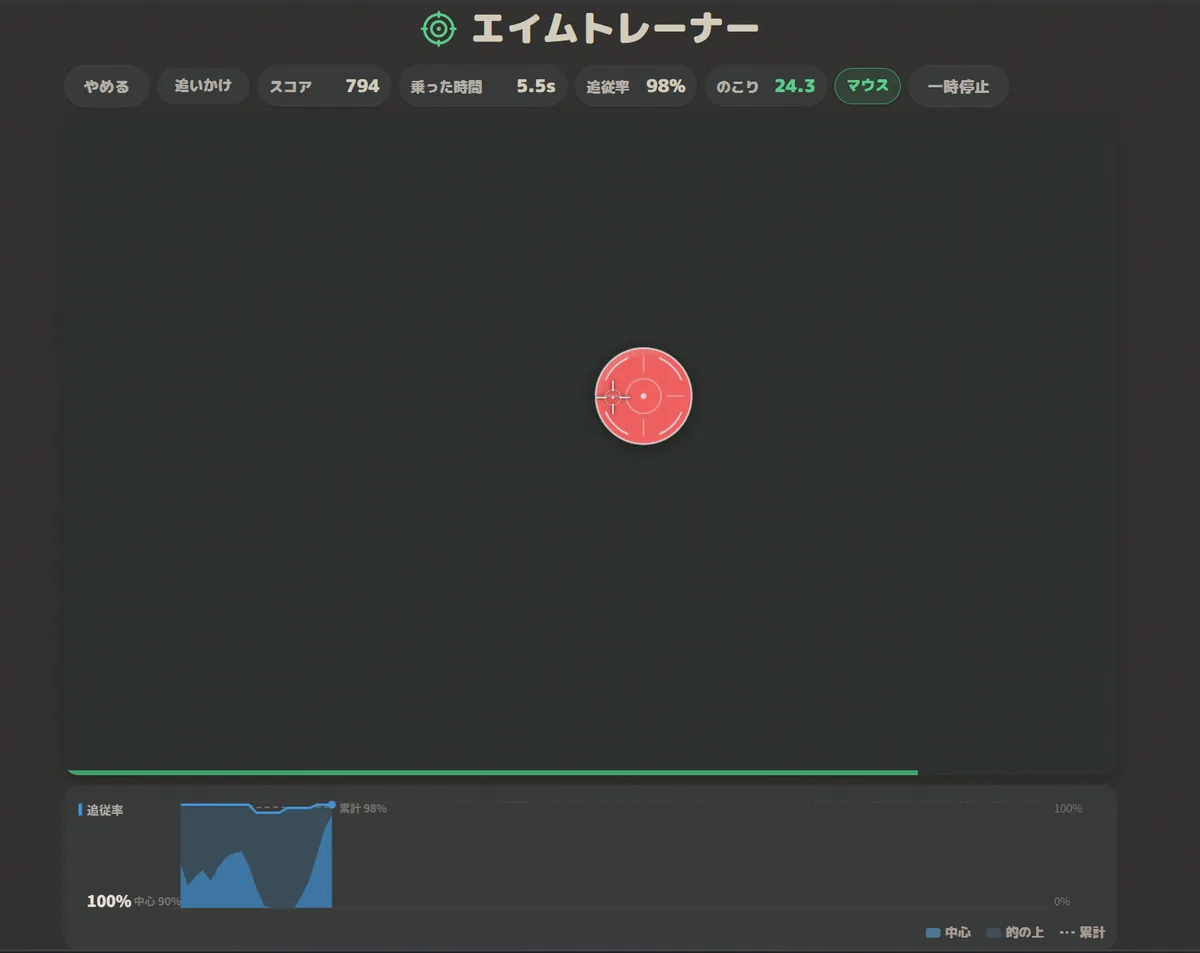
Levels 1–5 move target size, movement speed, flick distance and survival interval together. In the language of Fitts's law, raising the level means raising the index of difficulty. Since that changes what a score means, bests and history are stored separately per level.
Sort & shoot — choosing not to shoot
Round targets are to be shot; squares with a cross are not. Shooting one costs 150 points and breaks your combo.
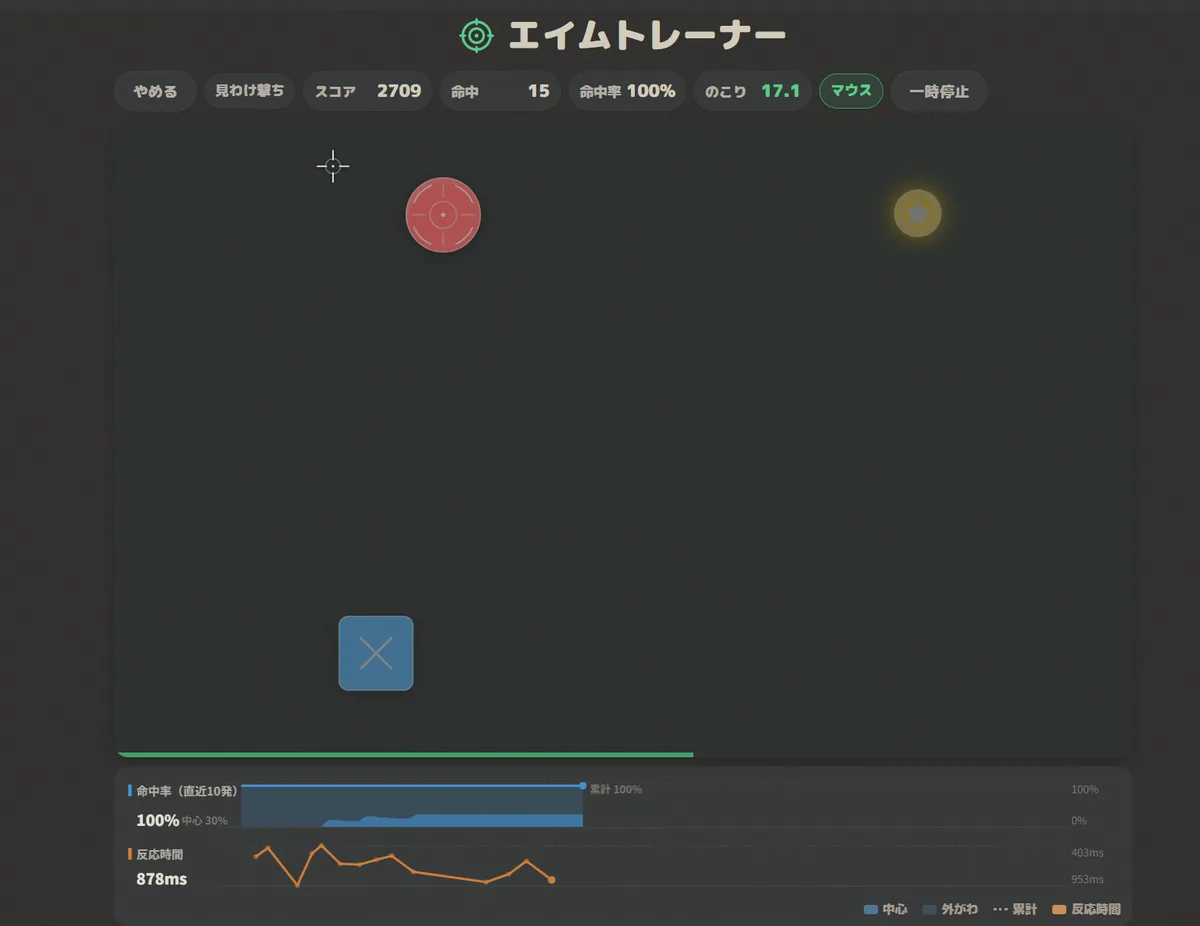
This is the shape psychologists call a Go / No-Go task. Reacting quickly and stopping a response already under way are different things, and a consensus guide written by more than forty researchers describes the latency of stopping as a covert variable that cannot be observed directly — when you succeed, no response appears. The same guide notes that never releasing a response and cancelling one already released may rest on partly different substrates.
Ordinary aim practice only ever uses the shooting side. The two target types differ in shape as well as colour, so the mode still works in the black-and-white plus shape setting.
Reading the three charts
While you are still playing, two of them are already running. Under the arena, accuracy over your last ten shots and reaction time per shot are drawn in two separate rows — overlaying quantities with such different units on one axis makes it unclear which one you are reading. The thick line is the last ten shots and the faint dotted line is the cumulative figure, so whenever the thick line sits below the dotted one, you are in the middle of falling apart.
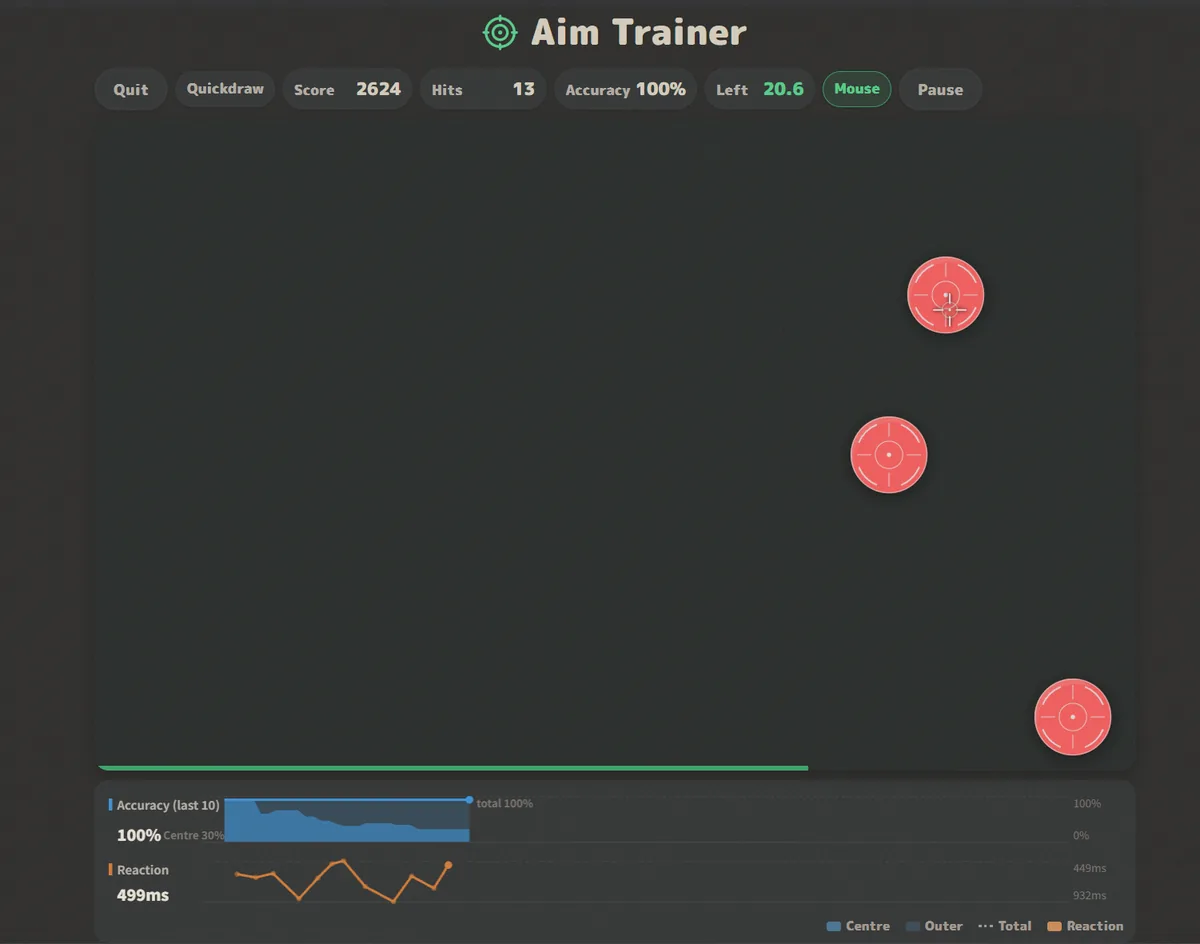
Then, once the run ends, three more come up on the result screen, because a score alone does not tell you what to fix.
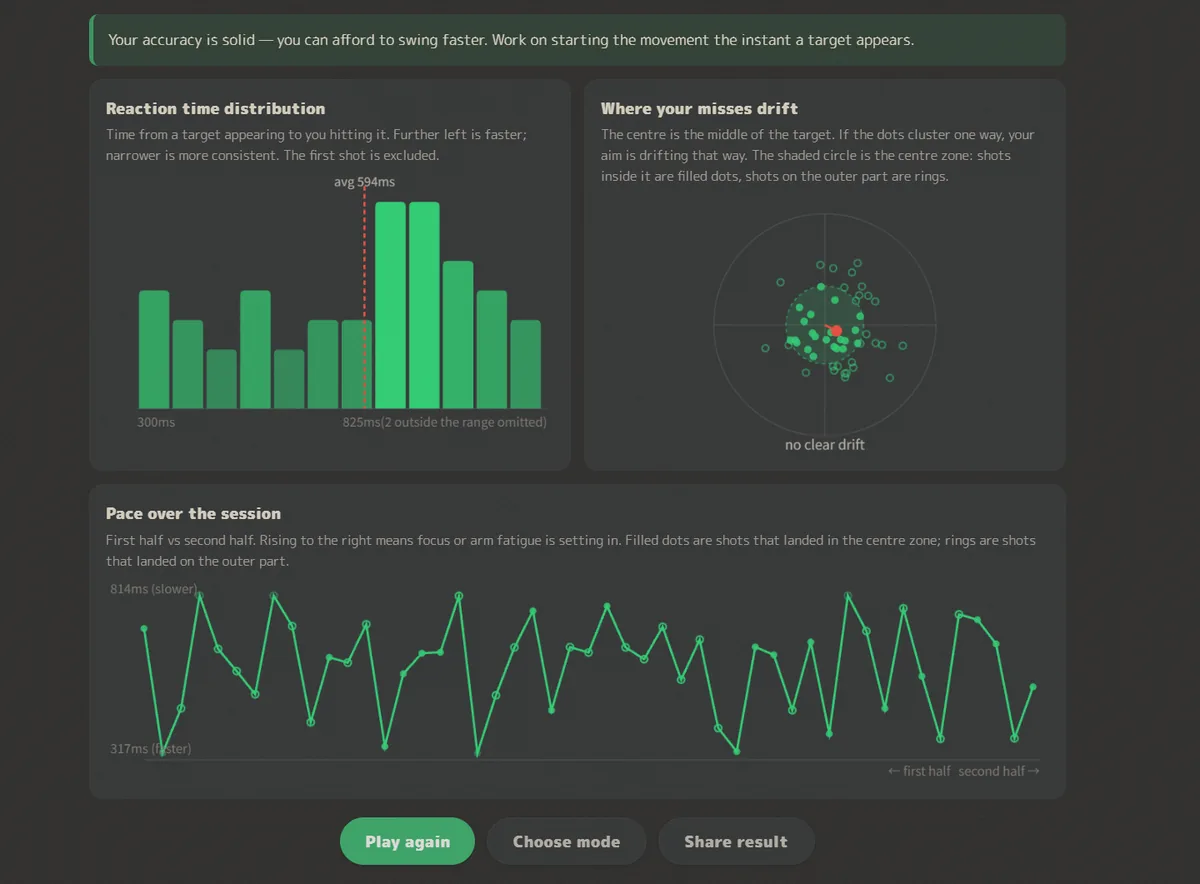
Reaction time distribution. A histogram of the time from a target appearing to your hitting it. Further left is faster; narrower is more consistent. You cannot see this in a mean, but if your pattern is the occasional wildly slow shot, reducing that spread is what brings the mean down. The first shot includes the time from starting to moving at all, so it is excluded.
Direction of your misses. Where your clicks landed relative to target centre, overlaid. Clustering to the lower right is common: it means you are pressing before the cursor has settled, which is overshoot. Purely vertical drift often comes down to chair height, desk height or monitor position rather than sensitivity.
Form over the run. How your reaction time moved within a single session. A line that rises to the right means you faded in the second half.
Accuracy first, speed second
The faster you move, the more your endpoints scatter. This speed–accuracy tradeoff has been described as a property choice behaviour cannot escape, observed from insects through rodents to primates. A study using aim trainer data measured individual skill precisely as a tradeoff curve between time-to-shoot and distance from target centre, using large and small targets together.
So speed and accuracy are not both raised at once — you choose where to balance them. That is why the rank here is TPS × accuracy2: squaring accuracy means spraying does not raise your rank. Scoring is weighted the same way.
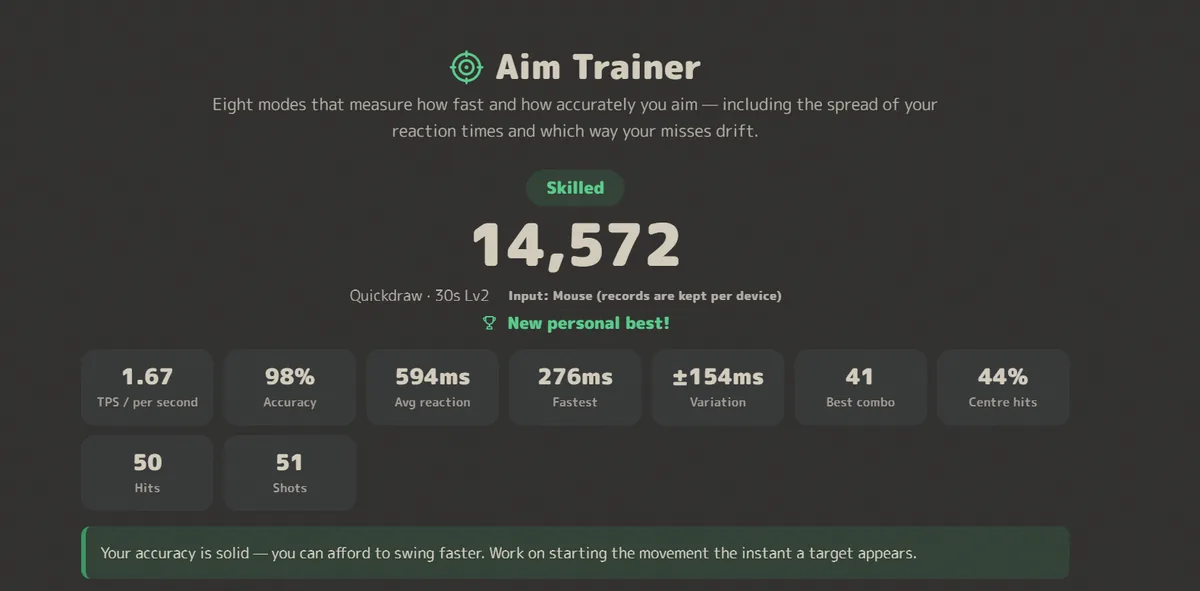
Under the numbers, the result screen also prints one line telling you what to do next, derived from that run. In the example above, 98% accuracy against 1.47 TPS is read as leaning too far towards accuracy. When accuracy is low and speed is high, the line points the other way.
The order I recommend is settle your accuracy first, then raise speed. Shooting fast and sloppily ends up slower once you count the re-shots. That is this page's design reasoning, not a research finding.
Mouse sensitivity: only the two walls are known
I could not find a peer-reviewed study on what sensitivity is optimal. Nothing addresses cm/360 or DPI directly.
What is known is the two ends. In studies manipulating CD gain — effectively mouse sensitivity — too low costs you through your arm's peak speed (about 1.5 m/s in the experiment) and through clutching, while too high increases overshoot. The same work states that CD gain has little effect on pointing performance until you approach the human limits of speed and accuracy. In other words, the middle is wide and insensitive.
Relatedly, a study of 72 gamers that varied only the mass of the mouse found 50 g, 60 g and 90 g to be 4% faster and 9% more accurate than 100 g, and a lower CD gain to be 34% more accurate and 14% more precise.
The page's own FAQ gives a feel rather than a number: can you cover two or three full turns of the view by dragging from one edge of the mousepad to the other? If you overshoot every big swing in Snap mode it is too high; if a full arm sweep does not get you there it is too low. Once you change it, leave it alone for a few days.
Thirty seconds, spread across days
For the same total time, spreading practice across days beats cramming it into one — a result that shows up across several motor skills. Learning a new gait pattern, a group split over two days gained significantly more than a group that did it all in one. In laparoscopic training, results ran spaced > breaks+nap > breaks > massed. In microvascular anastomosis, one session a day beat six.
The aim trainer data says the same thing. Across 7,174 people, 682,564 runs and up to 100 days, the benefit of extra practice on a given day was non-monotonic: improvement peaked around an hour, and 90% of the learning effect was already achieved with 30 minutes a day. Day-to-day retention was 40–60%.
"Spread it out" is not universal, though. For very short discrete tasks, a classic study found massed practice to be better. Continuous tasks favoured spacing; discrete ones went the other way.
If "form over the run" shows you fading in the second half, that is the signal. Longer is not stronger — split it into several 30-second runs.
Why mouse, finger and pen are recorded separately
The same score means different things depending on what you used. A finger gets the first shot off faster than a mouse, because touching the screen skips carrying the cursor entirely. It is worse at finding centre, though: a touch coordinate is the centroid of the contact patch, so it sits off your intended point, and the finger hides the target.
So the input device is recorded per shot, and bests and history are kept separately for each. Mixing two within one run files it under "mixed", away from either.
As a rule of thumb: a finger raises TPS and lowers centre rate; a mouse raises centre rate but costs time on big swings. Misses drifting low on touch is usually not a form problem — it is the contact patch sitting below your fingertip.
Why the aiming assists carry a score multiplier
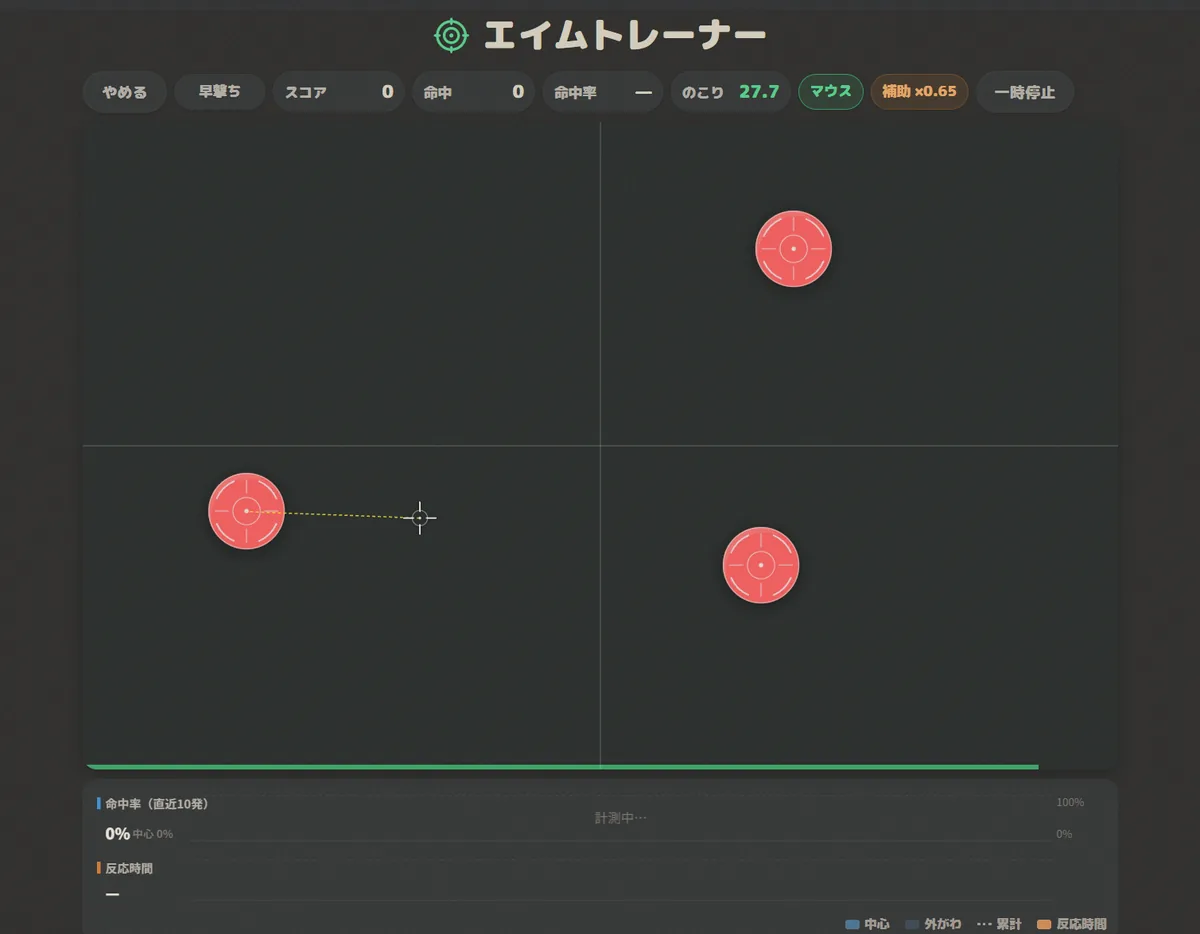
The settings can draw a crosshair at screen centre, or a line to the nearest target. This is the same idea as a crosshair overlay in competitive FPS, where almost every title treats it as cheating. Here it is a training aid, not something to bring anywhere competitive.
For practice I think it is fine. If you cannot see where screen centre is, or how far your aim currently sits from target centre, no amount of repetition will fix the shape of your drift. But putting an assisted score next to an unassisted one is not fair, so while an assist is on, the score is multiplied down (crosshair ×0.85, with ticks ×0.80, line to target ×0.65). The result screen also shows what you would have scored without it.
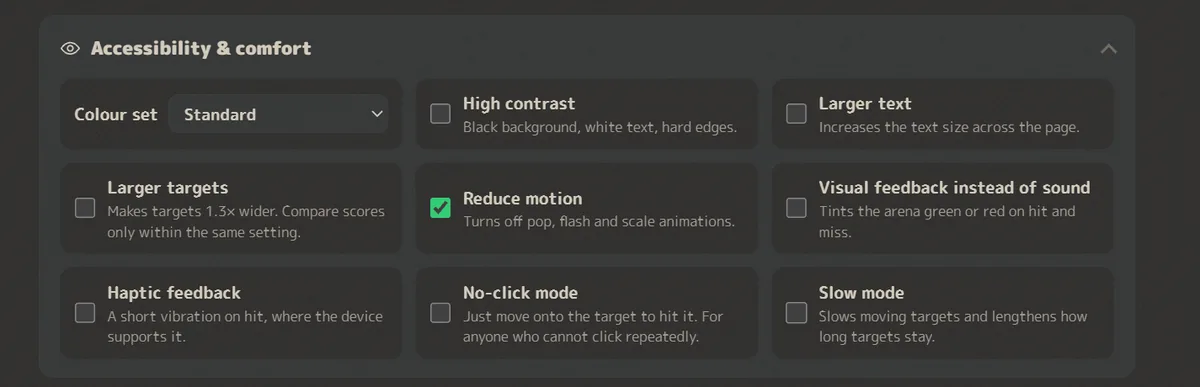
The universal-design settings — click-free mode, larger targets, slow mode — carry no multiplier. Those are not training wheels; they are what makes the same ground reachable.
Does it help in a real game? Where the evidence actually stands
This is the hard part to write. I could not find a single controlled study showing that practising on an aim trainer raises in-game performance in an actual FPS.
Here is what is known.
- Measurements inside a trainer are reliable. Ten esports players repeating the same tasks 3–5 days apart gave intraclass correlations of 0.947–0.995
- Improvement inside a trainer keeps going. Across 7,174 people and 682,564 runs, hit rate improved modestly while hits per second improved substantially — no early plateau of the kind laboratory tasks show
- FPS aiming is kinematically much like laboratory reaching. Panning and tilting a view, versus moving a cursor over a static background, produced near-identical kinematics
And there is a headwind. Practice effects are specific to the task, and far transfer is rare. In a trial where 11,430 people trained online for six weeks, every trained task improved while no transfer was found to untrained tasks — not even cognitively close ones. Meta-analyses of video game training (k = 310–359) found effect sizes small or zero.
Read plainly, that comes to this: an aim trainer improves what you did on the aim trainer. How much of it moves to a real game depends on how similar the movements are, and nobody has measured that yet.
On conflicts of interest. The learning-curve and tradeoff-curve studies cited above were funded by, and authored in part by employees of, Statespace Labs, which develops the aim trainer Aim Lab. Both papers declare this.
Try it
Eight modes, five levels. No sign-up, nothing to install. Records stay in your browser.
Open the Aim Trainer →Summary
- Reaction speed does not train, but carrying the cursor is a motor task and it does
- That carry is governed by distance and target width (Fitts's law). Raising the level raises the difficulty index
- Speed and accuracy are not both raised at once — you choose where to balance them
- For mouse sensitivity, only the two walls are known. The middle is wide, and no study names an optimum
- For the same total time, spread it across days. 30 minutes a day gets 90% of the learning
- Finger, mouse and pen are different instruments, so their records are kept apart
- No study yet shows transfer to real games
If you want to measure reaction speed itself, the reaction time test is the better fit. What each of its seven modes measures is a separate article.
This is one way of looking at it, and the research has limits. Some of the studies cited have small samples, and for several I could only confirm the abstract behind a paywall. If something here does not match what you have seen, I would be glad to hear it through the contact form.
Sources
Fitts's law and pointing
- Fitts PM (1954) The information capacity of the human motor system in controlling the amplitude of movement. Journal of Experimental Psychology 47(6):381–391 pubmed.ncbi.nlm.nih.gov (bibliographic record only; content verified via MacKenzie 1992)
- MacKenzie IS (1992) Fitts' law as a research and design tool in human-computer interaction. Human-Computer Interaction 7(1):91–139 yorku.ca
- Soukoreff RW, MacKenzie IS (2004) Towards a standard for pointing device evaluation: Perspectives on 27 years of Fitts' law research in HCI. International Journal of Human-Computer Studies 61(6):751–789 yorku.ca
Speed–accuracy tradeoff
- Heitz RP (2014) The speed-accuracy tradeoff: history, physiology, methodology, and behavior. Frontiers in Neuroscience 8:150 pmc.ncbi.nlm.nih.gov
- Donovan I et al. (2022) Assessment of human expertise and movement kinematics in first-person shooter games. Frontiers in Human Neuroscience 16:979293 pmc.ncbi.nlm.nih.gov
Response inhibition
- Verbruggen F et al. (2019) A consensus guide to capturing the ability to inhibit actions and impulsive behaviors in the stop-signal task. eLife 8:e46323 pmc.ncbi.nlm.nih.gov
Mouse sensitivity (CD gain)
- Casiez G, Vogel D, Balakrishnan R, Cockburn A (2008) The Impact of Control-Display Gain on User Performance in Pointing Tasks. Human-Computer Interaction 23(3):215–250 dgp.toronto.edu
- Conroy E, Toth AJ, Campbell MJ (2022) The effect of computer mouse mass on target acquisition performance among action video gamers. Applied Ergonomics 99:103637 pubmed.ncbi.nlm.nih.gov (abstract only)
Distributing practice
- Krishnan C (2019) Learning and interlimb transfer of new gait patterns are facilitated by distributed practice across days. Gait & Posture 70:84–89 pubmed.ncbi.nlm.nih.gov (abstract only)
- Spruit EN, Band GPH, van der Heijden KB, Hamming JF (2017) The Effects of Spacing, Naps, and Fatigue on the Acquisition and Retention of Laparoscopic Skills. Journal of Surgical Education 74(3):530–538 pubmed.ncbi.nlm.nih.gov (abstract only)
- Mokhtari P, Tayebi Meybodi A, Lawton MT (2021) Learning microvascular anastomosis: Analysis of practice patterns. Journal of Clinical Neuroscience 90:212–216 pubmed.ncbi.nlm.nih.gov (abstract only)
- Lee TD, Genovese ED (1989) Distribution of practice in motor skill acquisition: different effects for discrete and continuous tasks. Research Quarterly for Exercise and Sport 60(1):59–65 pubmed.ncbi.nlm.nih.gov (abstract only)
Learning inside a trainer, reliability, and transfer
- Listman JB, Tsay JS, Kim HE, Mackey WE, Heeger DJ (2021) Long-Term Motor Learning in the "Wild" With High Volume Video Game Data. Frontiers in Human Neuroscience 15:777779 pmc.ncbi.nlm.nih.gov
- Rogers EJ, Trotter MG, Johnson D, Desbrow B, King N (2024) KovaaK's aim trainer as a reliable metrics platform for assessing shooting proficiency in esports players: a pilot study. Frontiers in Sports and Active Living 6:1309991 pmc.ncbi.nlm.nih.gov
- Warburton M, Campagnoli C, Mon-Williams M, Mushtaq F, Morehead JR (2023) Kinematic markers of skill in first-person shooter video games. PNAS Nexus 2(8):pgad249 pmc.ncbi.nlm.nih.gov
- Owen AM et al. (2010) Putting brain training to the test. Nature 465(7299):775–778 pmc.ncbi.nlm.nih.gov
- Sala G, Tatlidil KS, Gobet F (2018) Video game training does not enhance cognitive ability: A comprehensive meta-analytic investigation. Psychological Bulletin 144(2):111–139 pubmed.ncbi.nlm.nih.gov (abstract only)
- Proteau L, Marteniuk RG, Lévesque L (1992) A sensorimotor basis for motor learning: evidence indicating specificity of practice. Quarterly Journal of Experimental Psychology A 44(3):557–575 pubmed.ncbi.nlm.nih.gov (abstract only)